
How Do Companies Keep Track of Employee Training?

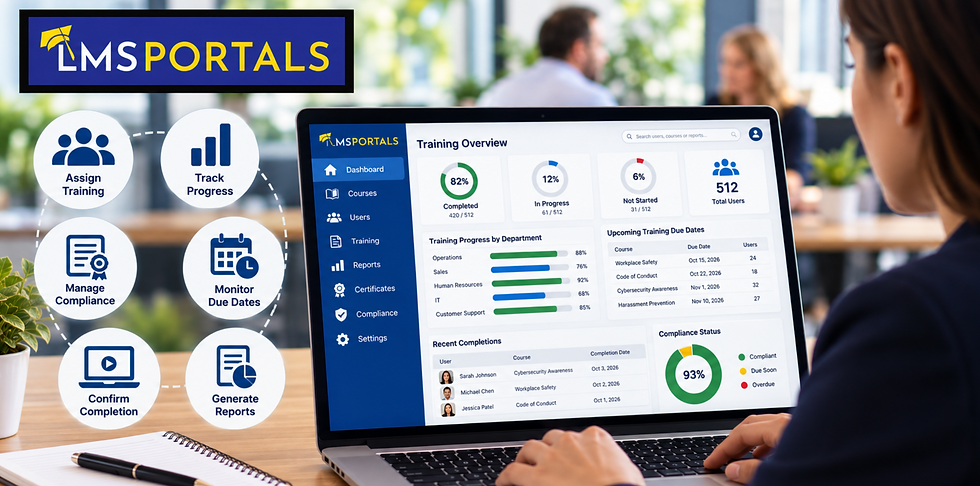
Employee training is an important part of building a capable, productive, and compliant workforce. Organizations invest in onboarding programs, professional development, compliance training, safety courses, cybersecurity awareness, leadership development, and other learning initiatives designed to improve employee performance.
But delivering training is only part of the challenge.
Companies also need to know who has completed required training, which courses employees have taken, when certifications expire, whether employees passed required assessments, and where additional training may be needed.
As organizations grow, keeping track of this information becomes increasingly difficult.
Spreadsheets and manual records may work for a small workforce, but they can quickly become cumbersome when training expands across departments, locations, job roles, or business units.
For this reason, many companies use a learning management system (LMS) to centralize employee training records and automate much of the tracking and reporting process.
What Does Employee Training Tracking Include?
Employee training tracking is the process of maintaining records about the learning activities employees complete throughout their time with an organization.
The information being tracked varies depending on the company and type of training being delivered.
Course Enrollment and Assignment
Companies often need to know which employees have been assigned specific courses.
Some training may be available voluntarily, while other courses are mandatory based on an employee's department, position, location, or responsibilities.
For example, a new employee might automatically receive onboarding courses covering company policies, information security, workplace conduct, and job-specific procedures.
Tracking assignments allows administrators to see who is expected to complete each training requirement.
Course Completion
One of the most common training metrics is simply whether an employee completed a course.
Completion records can help managers confirm that employees have received required training and identify individuals who still have outstanding assignments.
These records can become particularly important for compliance, safety, and regulatory training.
Assessment Results
Completing a course does not necessarily demonstrate that an employee understood the material.
For this reason, many training programs include quizzes, tests, or other assessments.
Companies may track assessment scores, passing status, number of attempts, and other results to demonstrate that employees achieved a required level of knowledge.
Certificates and Certifications
Some training programs provide certificates when employees successfully complete a course or learning program.
Other programs involve professional or regulatory certifications that may remain valid only for a specific period.
Tracking these credentials helps companies determine who is currently qualified and who may need additional or refresher training.
Training Dates and History
A complete training record typically includes dates showing when courses were assigned, started, and completed.
Maintaining historical records gives organizations a long-term view of an employee's learning activity.
This information can be useful for compliance audits, employee reviews, career development, workforce planning, and internal reporting.
Why Do Companies Need to Track Employee Training?
Training records provide much more than a list of completed courses. They help organizations manage risk, measure learning activity, and understand how training supports the workforce.
Maintaining Compliance Records
Many organizations operate in environments where employees must complete specific training.
Requirements may involve workplace safety, harassment prevention, data privacy, cybersecurity, industry regulations, ethics, or internal company policies.
Companies may need to demonstrate that required training was assigned and completed.
Centralized training records make it easier to retrieve this information when responding to an audit, customer requirement, regulatory inquiry, or internal compliance review.
Identifying Incomplete Training
Without a tracking system, managers may have difficulty determining which employees still need to complete required courses.
Training tracking provides visibility into outstanding assignments.
Instead of manually contacting every employee, administrators can identify incomplete training and focus their follow-up efforts on the people who still need to take action.
Supporting Employee Development
Training records can also support broader talent development initiatives.
Managers can review the courses employees have completed and identify opportunities for additional development.
For example, an employee preparing for a management position might complete courses covering leadership, coaching, communication, project management, and conflict resolution.
Over time, the employee's training history becomes part of a larger picture of professional development.
Understanding Training Participation
Organizations may also want to understand how employees interact with their learning programs.
Administrators can analyze metrics such as:
Course enrollments
Course completion rates
Assessment results
Overdue assignments
Training activity by department
Training activity by location
Certification status
Learning program participation
These insights can help companies determine whether their training programs are reaching the intended audiences.
How Do Small Companies Track Employee Training?
Smaller organizations often begin with relatively simple tracking methods.
Spreadsheets
A spreadsheet may contain employee names, assigned courses, completion dates, scores, and certification information.
This approach can work when the number of employees and training requirements is limited.
However, spreadsheets require ongoing manual updates. As the company grows, administrators may need to maintain increasingly complicated worksheets containing hundreds or thousands of training records.
Errors, outdated information, inconsistent data entry, and version-control problems can become significant challenges.
Shared Documents and Files
Some companies maintain training records in shared folders or individual employee files.
Certificates, attendance sheets, and other documentation may be stored manually.
While this provides a record of training activity, finding and reporting on the information can become difficult.
An administrator preparing for an audit, for example, might need to search through numerous folders to locate the required documentation.
HR Systems
Human resources platforms sometimes include basic functionality for recording employee training.
This can be useful for maintaining a high-level employee record.
However, organizations that deliver substantial online training may need capabilities specifically designed for creating, assigning, delivering, tracking, and reporting on learning activities.
That is where an LMS becomes valuable.
How Does an LMS Track Employee Training?
A learning management system provides a centralized environment for managing training activities and records.
Instead of manually entering each completion into a spreadsheet, much of the information can be captured automatically as employees interact with the training platform.
Centralized Employee Training Records
An LMS creates a central location for employee learning information.
Administrators can manage users, assign courses, review activity, and access training records from the same platform.
Employees can also log into the system to access their assigned learning materials.
This reduces the need to maintain separate systems for course delivery and training records.
Automatic Course Completion Tracking
When an employee completes an online course, the LMS can record that activity automatically.
Depending on the course and platform configuration, the system may track information such as course status, completion date, assessment score, and certificate status.
This eliminates much of the manual work associated with maintaining training records.
Assessments and Knowledge Checks
Companies can incorporate assessments into online courses to evaluate employee understanding.
Results can become part of the employee's training history.
Administrators can then review whether employees successfully completed the assessment requirements associated with a particular course.
Reporting
Reporting is one of the most important benefits of using an LMS for training tracking.
Rather than reviewing individual records one at a time, administrators can generate reports that summarize training activity across the organization.
Managers may be able to review completion status for specific courses, groups, departments, or other employee segments.
This can dramatically reduce the time required to answer common training questions.
How Do Companies Track Training Across Multiple Departments or Locations?
Training becomes more complicated when organizations have multiple departments, offices, subsidiaries, franchises, clients, or other distinct audiences.
A single training environment may eventually become difficult to organize.
Using Groups
One approach is to organize employees into groups within an LMS.
Groups might represent departments, locations, job roles, teams, or other categories.
Administrators can then assign specific courses to the appropriate groups and report on training activity by audience.
Using Multiple Training Portals
Organizations with more complex structures may benefit from a multi-tenant LMS.
A multi-tenant LMS allows an organization to create separate learning environments, or portals, while maintaining centralized administrative oversight.
For example, a company might create individual training portals for different:
Business units
Geographic regions
Subsidiaries
Customers
Partners
Franchise locations
Contractor populations
Each portal can provide a more focused experience for its audience while the organization maintains broader control over its training ecosystem.
How Can Companies Improve Their Employee Training Records?
Technology is important, but effective training tracking also requires a consistent strategy.
Define What Needs to Be Tracked
Organizations should first determine which training records are important.
Not every course needs the same level of documentation.
Mandatory compliance training may require detailed completion and assessment records, while optional professional development courses may require less formal tracking.
Standardize Training Assignments
Companies should establish clear rules regarding which employees need which courses.
Assignments may be based on factors such as role, department, location, seniority, or regulatory requirements.
Standardization helps prevent employees from accidentally missing required training.
Maintain Historical Records
Organizations should consider the long-term value of training data.
An employee's training history may be useful long after an individual course has been completed.
Historical records can support audits, employee development, certification management, and internal reporting.
Review Training Reports Regularly
Training reports are most useful when organizations review them consistently.
Managers might periodically examine completion rates, overdue assignments, assessment performance, and other indicators.
This turns training data into an active management resource rather than simply an archive.
What Are the Benefits of Using LMS Portals to Track Employee Training?
LMS Portals is a SaaS learning management system designed to help organizations deliver, manage, and track training through centralized administration and flexible learning environments.
Its multi-tenant architecture can be particularly valuable for organizations that need to manage training across multiple audiences.
Centralized Training Management
LMS Portals provides administrators with a centralized environment for managing users, courses, learning activity, and reporting.
Instead of maintaining separate spreadsheets and disconnected training records, organizations can manage training within a structured system.
This can reduce administrative effort while improving visibility into employee learning activity.
Multiple Branded Training Portals
Organizations can create multiple branded learning portals for different training audiences.
For example, a company could operate one portal for employees, another for customers, and additional portals for partners, contractors, or individual business units.
This approach enables organizations to separate learning experiences without creating completely independent training systems.
Flexible Course Delivery
Companies can use LMS Portals to deliver different types of training content and organize learning experiences around specific audiences.
Training programs might include onboarding, compliance, professional development, leadership, cybersecurity, product knowledge, or customer education.
Administrators can organize course libraries to make relevant training easier for users to find and complete.
Reporting and Training Visibility
Centralized reporting gives administrators greater visibility into training activity.
Rather than relying on employees or managers to manually report completions, organizations can use LMS data to review learner progress and course activity.
This becomes increasingly valuable as the number of learners, courses, and training audiences grows.
Support for Extended Enterprise Training
Employee training is often only one part of an organization's learning strategy.
Companies may also need to train customers, channel partners, contractors, franchisees, resellers, or other external audiences.
The multi-portal architecture of LMS Portals allows organizations to expand beyond internal employee training while maintaining centralized oversight.
This can help companies create a broader learning ecosystem without managing a separate LMS for every audience.
When Should a Company Move From Spreadsheets to an LMS?
There is no specific number of employees at which a company must adopt an LMS.
The better question is whether the organization's training process has become difficult to manage manually.
An LMS may be worth considering when administrators spend significant time updating spreadsheets, managers struggle to determine who has completed required training, training records are spread across multiple systems, or reporting requires extensive manual work.
The need can become even greater when training involves recurring compliance requirements, multiple locations, numerous courses, or several distinct learning audiences.
The objective is not simply to replace a spreadsheet with software. It is to create a more scalable process for delivering training and maintaining reliable learning records.
Employee Training Tracking Should Become Easier as a Company Grows
A small organization may be able to track training with spreadsheets, documents, and manual processes. But those approaches can become increasingly difficult to maintain as training programs expand.
A learning management system provides a more structured approach by bringing course delivery, employee activity, assessments, completions, and reporting into a centralized environment.
For organizations with more complex requirements, a multi-tenant platform can take this approach further by allowing multiple learning audiences to operate through separate portals while remaining part of one centrally managed training ecosystem.
LMS Portals helps organizations build this type of scalable training infrastructure.
Companies can create branded learning environments, organize training for different audiences, maintain centralized administrative oversight, and expand their learning programs as their requirements evolve.
The result is more than better recordkeeping. It is a foundation for managing employee training as an ongoing business process—one that can support compliance, employee development, organizational growth, and a broader learning strategy.
About LMS Portals
LMS Portals provides a flexible, SaaS-based multi-tenant learning management system for delivering training to employees, customers, partners, clients, and other learning audiences.
Our multi-portal architecture enables organizations to launch dedicated, branded learning environments while centrally managing users, courses, compliance, reporting, and administration.
The platform includes tools for creating and delivering SCORM-compliant courses, a library of ready-made training courses, and Learning Paths for building structured training programs. LMS Portals also supports virtual instructor-led training, certification programs, automation, reporting, and social learning.
Together, these capabilities make LMS Portals a scalable solution for organizations managing training across multiple audiences.
Contact us today to get started or visit our Partner Program pages


Comments